-
 Automated
Image Sequencer. The time has come for you to take your
place in ACES history and join the ranks of those who have gone before
you. All ICS3Mers
are required to submit the final version of their Platform project
that will yield
an
animated entry into our Fractal
Archive. As you can see, your name is already there. Last
year's was the weakest effort as you can see by the number of students whose
name appears, but no video follows. These students bombed the exam.
To avoid a similar fate, do a good job with this last stage. Automated
Image Sequencer. The time has come for you to take your
place in ACES history and join the ranks of those who have gone before
you. All ICS3Mers
are required to submit the final version of their Platform project
that will yield
an
animated entry into our Fractal
Archive. As you can see, your name is already there. Last
year's was the weakest effort as you can see by the number of students whose
name appears, but no video follows. These students bombed the exam.
To avoid a similar fate, do a good job with this last stage.
There are a number of careful considerations that must be made in order
to produce a good animation. Look
at this example. This is a poor offering for a host of reasons that
include: a zoom factor that is too high (0.50-you'll
likely prefer a value between 0.90 and 0.99 to be smooth), at 30 frames,
it's too short (between
150 and 200 are required to keep the viewer engaged), and at deeper depths
there weren't enough iterations to provide the necessary detail (you'll
probably want to be between 500 and 1000).
A good animation will synchronize smooth manipulations of both scale and position.
However, since we're only able to devote one class session to this development,
we'll focus exclusively on changing scale and work with a fixed position.
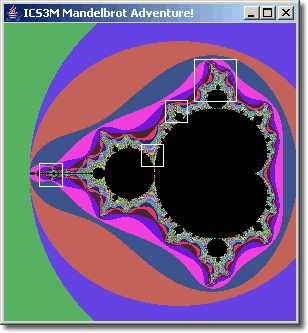
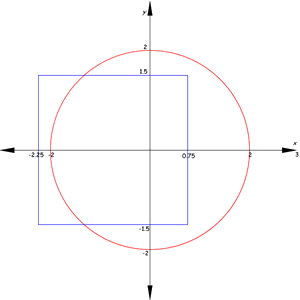
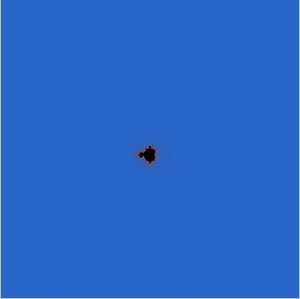
An awkward jump from the default
center at -0.75+0i to
the centre of your zoom sequence ca nbe avoided by starting
with a very large domain similar to the grapihic to the right (this will
add some suspense as well!).
Note: Inspired explorers can choose to remain after class and I will discuss
the position
considerations. Enough talk, let's begin.
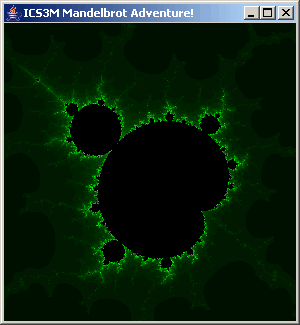
- Using your manual Mouse Zoom capabilities, dig deep into the M-Set, identifying
the Complex coordinates of a target destination for your video sequence.
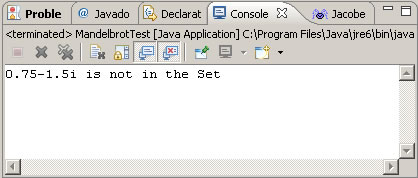
To assist this process, you should report the corresponding Complex coordinates
of the mouse click to the Console Window along the way. One of the interesting
features of any video is how deep it actually penetrates the Set.
This begs
the question, "How
deep can we go?". After reflection you realize it would depend on
the domain and range having 400 (or whatever dimension your screen canvas
is set to) different values to work with. If there are less than 400,
rounding would yield two or more blocks of similarly coloured pixels,
degrading your resolution. Now, since your domain and range are doubles,
this is currently the limiting factor relating to the depth. Since the
primitive double type has
an accuracy of roughly 15 significant digits, when your domain approaches
this value, you're about as deep as you can go. Consequently it would
also be wise to report the domain to the Console Window so you can monitor
your depth (for inspired Mandelbrot explorers, switching to the BigDouble class
removes this restriction and you can go as deep as RAM will allow, but
with obvious performance degradations).
- To your KeyPressed(KeyEvent em) method,
you add code to initiate the creation of your sequence on the pressing
of the v key. At this point
make a call to your Content class's generateFrames() method,
  public void generateFrames() {
    int frames = 10;
    // Parameters: vCentreX, vCentreY, vDomain, vZoomFactor, frames
    mandelbrot.setVideoProperties(-0.1732986271032131, 1.0601239993629323, 30, 0.50, frames);

    zoomLevel = 1;
    Graphics g = this.getGraphics();

    for (int f = 0; f < frames; f++) {
      System.out.println("Drawing Frame:" + zoomLevel);
      drawMandelbrot(g);
      screenCapture();
      // Updates viewing parameters for the next frame: domain, leftBound, rightBound, bottomBound and topBound
      mandelbrot.nextFrame();
      zoomLevel++;

    }
  }
will produce a sequence of saved .jpg images to the root of your Platform
project folder. Ultimately you should have between 100 and
270 frames in your video, but I recommend starting with 10 and a substantial
zoom
factor (50%) to work out the code. Only after
it's appears to be working, increase the frames to the final number
and set your zoom factor to
just under 1.0 to enable smooth scaling.
-
The drawMandelbrot(g) method
introduced above is similar to the code you have in your paintComponent() method.
Something fashioned after the following will suffice,
  public void drawMandelbrot(Graphics g) {
    Graphics2D g2 = (Graphics2D) g;

    // draw the fractal
    for (int c = 0; c < WIDTH; c++) {
      for (int r = 0; r < HEIGHT; r++) {
        // determine if that point is part of the set
        if (mandelbrot.isPartOfSet(c, r)) {
          g2.setColor(Color.BLACK);
        } else {
          g2.setColor(palette.getColor(fractal.iteration() % 256));
        }
        g2.drawLine(c, r, c, r);
      }
    }

  }
- We will now bypass the Mandelbrot class
with further enhancements and add resources directly to the Fractal class.
First, you'll need something to house the coordinates of the fixed target
of your zoom sequence. You could use an object of the Point2D.Double class,
but I suggest you simply add the declaration below to your Fractal class,
private double TARGET[] = new double [2];
along with the instance fields,
private double videoCentreX, videoCentreY, videoDomain, videoZoomFactor;
- Now you can add can add the bodies of the setVideoProperties() and nextFrame() methods
to your Fractal Class that
does the setup and update of the viewing parameters for each subsequent
image.
- Of course you don't have to follow anything I've said above. I just ask you
to submit original code that produces the results I need to stitch
your
sequence together into a video.
The deadline is midnight, Tuesday June 1. All project source files
and a sequence of up to 270 .jpgs are to be attached to your email to
handin. Once I create
and mount all your videos, I'll call for your recommendations
for the three you
think best reflect our efforts over the past month and showcase
them on the SSD over the exam period.
|