2009-2010 ICS3U Software Engineering Tasks |
iTunes. In this project you will simulate the maintenance (sorting) of an iTunes Playlist.

Task. Create the project, iTunes and add this driver. Add the text file, Music.txt to the project. As you can see, the driver instantiates a PlayList object to maintain the list of songs. Implement the PlayList and Song classes as defined by the UML diagrams to produce output similar to the above. In addition, you are to add code to the iTunes driver that will permit users to enter a song title by name and the program will report the position of the song in the array or indicate the Song was not found. To assist with this, you are to add the methods int linearSearchByName(String n) and int binarySearchByName(String n) to your PlayList class (a bonus will be awarded for a recursive implementation of the int binarySearchByName(String n) method). Finally, your project should have the following features,
- The PlayList constructors should cascade depending on the supplied parameters (defaults: n-NoName; initialCapacity-10)
- PlayList's index variable points to the next available empty cell in the list array
- When list is full, it should double it's size (use System.arraycopy() to assist in the creation of the new array)
- PlayList's sort() method should sort on Song's name field, to start with. Test all other fields prior to submission
- Song's constructor will use String's split(String s) method to parse the packed record into a String array that can assist with assigning values to the respective instance fields.
- Full Javadoc.

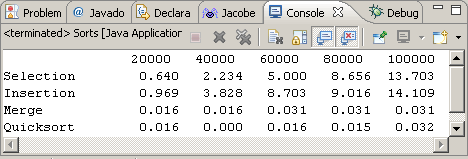 Sorts. The
search for a fast, efficient sorting utility has led to
the development of numerous algorithms. Some techniques are easy to understand
and code, but can execute relatively slowly. Others are extremely fast, but
challenging to understand and maintain. In this assignment, you are asked
to compare (time) the
speed of four popular algorithms (Selection, Insertion, Merge
and Quicksort). We've developed code for the first two from the pseudocode.
You
can combine this effort with your implementation of the QuickSort pseudocode
(C. A. R. Hoare). A
sample
run
on
my
computer
yields
the
results
at the right (2.4GHz P4).
Sorts. The
search for a fast, efficient sorting utility has led to
the development of numerous algorithms. Some techniques are easy to understand
and code, but can execute relatively slowly. Others are extremely fast, but
challenging to understand and maintain. In this assignment, you are asked
to compare (time) the
speed of four popular algorithms (Selection, Insertion, Merge
and Quicksort). We've developed code for the first two from the pseudocode.
You
can combine this effort with your implementation of the QuickSort pseudocode
(C. A. R. Hoare). A
sample
run
on
my
computer
yields
the
results
at the right (2.4GHz P4).
 In
the single Java program, Sorts.java,
implement the four algorithms to sort a randomly-generated integer
array of increasing size (for accurate comparison, each method will
sort
the same array). Timer support has been added to assist your efforts. For
optimum results you should close
all other running processes. For
convenience, the code writes the timing results in an Excel-convenient format
(space for
columns, \n for
rows) to the
text
file, Timing.txt. (Note: Remember this code, it'll be handy for future
projects
and is an example of how careful consideration of the use to which output is
intended, leads
to
superior code) Excel opens text files easily (Data>Import
External Data>Import
Data...).
Simply
tell
it
in
this
case
that a space character is used as the delimiter.
In
the single Java program, Sorts.java,
implement the four algorithms to sort a randomly-generated integer
array of increasing size (for accurate comparison, each method will
sort
the same array). Timer support has been added to assist your efforts. For
optimum results you should close
all other running processes. For
convenience, the code writes the timing results in an Excel-convenient format
(space for
columns, \n for
rows) to the
text
file, Timing.txt. (Note: Remember this code, it'll be handy for future
projects
and is an example of how careful consideration of the use to which output is
intended, leads
to
superior code) Excel opens text files easily (Data>Import
External Data>Import
Data...).
Simply
tell
it
in
this
case
that a space character is used as the delimiter.
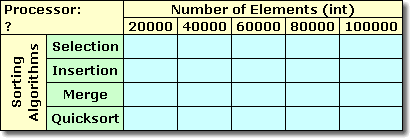
Identify the speed of the processor used for your results on the worksheet. Provide an appropriately-labeled graph of the timing results on a separate, full page worksheet, appropriately renamed. Submit both Sorts.java and Sorts.xls to handin by the deadline.
HTML: Personal SSD. One significant (currently unexploited by us) benefit that Java has over other mid- to high-level languages is its smooth integration with web pages. Since a number of future projects (this year and next) will be deployed to the internet as graphic applets, it's time to add simple web page development to your skill set. The SSD is simply a page of links that all the students of the Senior School need to have in one place to improve their productivity. Any one student doesn't need all these links so, in this exercise, you are asked to develop a more customized set of resources to further increase your productivity.
Task. Using your nascent HTML skills, create the file index.html in TextEdit that contains links to only your courses (and other resources) you have regular need of. These course links are simply pages that faculty maintain in their own Web Publishing Folder. Here's the link to the left navigation panel of the SSD that you can mine for the links to your respective courses. When you load the web page, ctrl-click and select This Frame>View Frame Source. Scroll down into the SPECIALIZATION YEAR area and take a look. As an example, since the (relative) link for Physics looks like this,

you'll need to piece together the full, absolute URL for your page as follows, http://ssd.rsgc.on.ca/0910SSD/Courses/SPH3UIndex.html. For each of your courses, assemble the links in your index.html file and test the file in Firefox (dn't use Safari, it's inferior). When you're satisfied, import the document into the root of your Web Publishing folder and test the link from our course page to see that all is well.
Finally, with web skills now part of your portfolio, don't hesistate to ask teachers if you can complete their assignments in web form to further solidify your skills. Also, since the content of your web page reflects not only your reputation, but mine and the school's, you are asked to limit the content of your home page to only academic content necessary for your immediate scholastic success. You get my point.
 Polygon.
Develop the class,
Polygon, that encapsulates an ArrayList of Point2D.Double objects,
each representing a separate vertex of a convex polygon. Support methods,
Polygon.
Develop the class,
Polygon, that encapsulates an ArrayList of Point2D.Double objects,
each representing a separate vertex of a convex polygon. Support methods,
public void addPoint(Point2D.Double
aPoint)
public double area()
public Point2D.Double getCentroid()
public Polygon midpointPoylgon()
public String toString()
You area() method should provide an efficient implementation of the Shoelace algorithm. Use the driver, PolygonTest.java, to test your class. Submit only your Polygon class, Polygon.java. I'll modify the driver when I test your class.
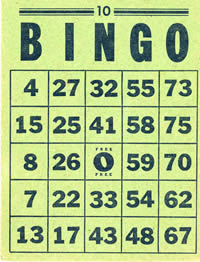 Bingo. This
three-part assignment is designed to solidify your array and Arraylist<E>
skills.
Bingo. This
three-part assignment is designed to solidify your array and Arraylist<E>
skills.
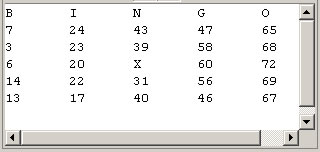
Bingo1: BingoCard. Create a project called Bingo1 and add this driver. As you can see, the driver simply instantiates and displays an instance of a BingoCard class. Provide an implementation of the BingoCard class that follows this basic UML design. You output should look similar to the capture below.

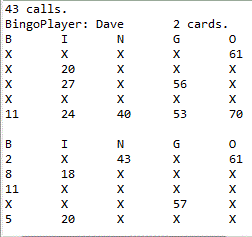 Bingo2: BingoPlayer.
In this stage you will simulate a one-player Bingo Game. A player has
a name and
can have as many cards as you choose. The 75 possible calls (B1 to O75) are
loaded into an array and then randomized. The driver loops through the calls
and the player marks an X on each card that matches the call. Before returning
for the next call, the driver calls the player's isWinner() method
that, in turn, calls each of his/her card's isWinner() method
to determine whether any of the player's cards is a winner (12 ways per card).
If there
is a winner, play stops and the total number of calls is displayed, together
with the state of
EACH
of the player's cards for visual verification.
Bingo2: BingoPlayer.
In this stage you will simulate a one-player Bingo Game. A player has
a name and
can have as many cards as you choose. The 75 possible calls (B1 to O75) are
loaded into an array and then randomized. The driver loops through the calls
and the player marks an X on each card that matches the call. Before returning
for the next call, the driver calls the player's isWinner() method
that, in turn, calls each of his/her card's isWinner() method
to determine whether any of the player's cards is a winner (12 ways per card).
If there
is a winner, play stops and the total number of calls is displayed, together
with the state of
EACH
of the player's cards for visual verification.
Task. Create a new project entitled, Bingo2 and drop in this driver. Configure the project's Build Path by adding the Project Bingo1. In this way, you will only have one BingoCard class on your computer. Create a BingoPlayer class that matches this UML diagram to the letter! Sample output appears to the right.
Bingo3. The final stage of the Bingo trilogy should be obvious. You are to simulate a multiplayer Bingo Game. In the past few lessons you have been introduced to Java's ArrayList<E> class that offers users a suite of methods for the convenient manipulation of arrays. So, just as the Integer and Double classes are wrapper classes for ints and doubles respectively, the ArrayList<E> class can be thought of as a wrapper for arrays.
Task. Create a project called Bingo3. Add the Bingo2 and Bingo1 Projects to Bingo3's Build Path. Add the text file Players.txt to the Project's root. Examine the contents of the file. The data file has a number of records that contain two fields each (the player's name and number of cards), separated by a tab. Using much of Bingo2's driver code, create the driver for Bingo3 that uses the data from Players.txt house the list of players. Then, undertake a Bingo game in which all players are involved until a winner is identified. For verification, print out only the winning player(s) and all of his cards. Note, I will use a different Players.txt file (with the same field structure) when I evaluate your project.
 Statistical
Methods: BarChart. Unlike most previous assignments
this week's is far less prescriptive. You have learned a great deal over the
past year and it's time for me to see what code design and programming decisions
you can make on your own. For the Academic Breakfast last week Ms. Wagar
tallied the number of students whose averages fell into each of the ten categories
from 0 to 99 (no one earned
100%) Ms. Wagar's output looked like the graphic to the right.
Statistical
Methods: BarChart. Unlike most previous assignments
this week's is far less prescriptive. You have learned a great deal over the
past year and it's time for me to see what code design and programming decisions
you can make on your own. For the Academic Breakfast last week Ms. Wagar
tallied the number of students whose averages fell into each of the ten categories
from 0 to 99 (no one earned
100%) Ms. Wagar's output looked like the graphic to the right.
Task. Create a project called BarChart.To accomplish this simulation you will ask the user to submit the number of students (over some required range). The code then creates an array of ints equal to this number and populates it with random ints over the interval [0,100). A method then accepts this array, the low and high values of 0 and 99 respectively, and the number of categories (the above sample run used 10 categories) and then returns an array in which each cell contains the number of entries that fell into each category. The program then graphs a line of asterisks of length equal to the value of each cell in this tallied array.
Note. Apart from code that works, I will be looking to see the class and method design decisions you make. Finally, given such broad parameters, it is highly unlikely any two submission will look the same. Submit BarChart.java and any other required files by the deadline.
Transcendental Functions. The Math class offers a wide variety of mathematical tools for use by clients. (the trigonometric functions are members of a class of functions known as transcendentals in that the exact value can't be computed precisely, but rather is approximated, typically through the addition of successive terms in a well-defined series)
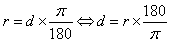
Degrees (d) to Radians (r). The Math class offers two built-in conversion methods, toDegrees(double angrad) and toRadians(double angdeg) for your convenience that implement the following definitions,
Infinite Series Approximations of the Transcendental functions sin(x) and cos(x), x in R (radians)


Task. Create a new project naming it Transcendentals and drop in the driver Transcendentals.java. To your NumericalMethods class add implementations for the following two methods,
public static double sin( double angle )and
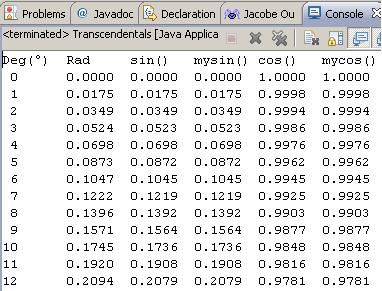
public static double cos( double angle )that can be used to confirm the accuracy of the built-in methods of the Math class. If your NumericalMethods class works properly, the project will yield the output below (up to 45°). Submit NumericalMethods.java by the deadline.
 Projectile
Flight. This assignment is an extension of Exercise P6.2 on page
278. Note: Maximum credit will be resevered for students who's
code reflects good design decisions and efficient implementation. It is
no longer sufficient to simply have the program produce correct results.
So,
read the problem thoroughly, as early as possible, and think.
Projectile
Flight. This assignment is an extension of Exercise P6.2 on page
278. Note: Maximum credit will be resevered for students who's
code reflects good design decisions and efficient implementation. It is
no longer sufficient to simply have the program produce correct results.
So,
read the problem thoroughly, as early as possible, and think.
Task A. Create a project entitled ExP6_2 and drop in this partially-completed driver. Create a Cannonball class containing the resources defined in the UML diagram to the right, and add statements between the markers in the driver to integrate the Cannonball object to produce output similar to that shown.
 Task
B. Create
an Excel file entitled ExP6_2.xls. Delete Sheet
2 and Sheet 3 and rename Sheet1 to Data. Copy the data
(including the column headings) from your Eclipse console window and
paste it into the Data worksheet starting at cell A1. Engage Excel's
Chart wizard to produce a Line Chart depicting the two
series you have data for. Save the chart to a new Worksheet, entitled Chart.
Add the bells and whistles to make worksheets visually appealing. Save the
file with the Data worksheet visible.
Task
B. Create
an Excel file entitled ExP6_2.xls. Delete Sheet
2 and Sheet 3 and rename Sheet1 to Data. Copy the data
(including the column headings) from your Eclipse console window and
paste it into the Data worksheet starting at cell A1. Engage Excel's
Chart wizard to produce a Line Chart depicting the two
series you have data for. Save the chart to a new Worksheet, entitled Chart.
Add the bells and whistles to make worksheets visually appealing. Save the
file with the Data worksheet visible.
Attach your ExP6_2 and Cannonball classes, together with ExP6_2.xls to an email to handin by the deadline.
Line.
At this point in your development, it is no longer sufficient to produce code
that simply works, you have to think deeply about the exercise, use the appropriate
tools, and code in justifiable efficiencies. Consider Exercise P5.15 on
page 224, henceforth known as,
LineTest.
Using
this LineTest.java driver,
develop the UML diagram as the file Line.uxf and
implement the Line class
as required to produce this
output. Attach Line.java and Line.uxf to an email
with the requested ubject to handin by the deadline.
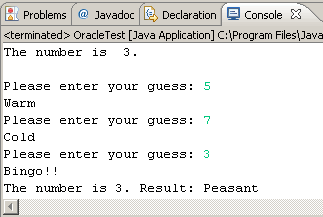
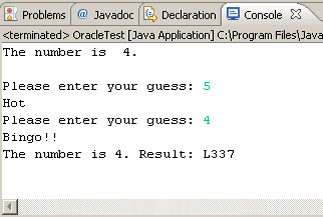
Table 1. Each Guess |
Table 2. Summary |
||
| Guess |
Result |
Number of Guesses |
Level |
exactly |
Bingo!! |
1 |
Jedi |
within 1 |
Hot! |
2 |
L337 |
within 2 |
Warm |
3 |
Peasant |
otherwise |
Cold |
otherwise |
n00b |
 Task.
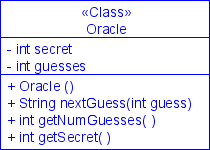
You are to give the user no more than three attempts
to discover the secret digit. Summarize each game by labeling the player's
outcome
according to Table 2. In addition to printing the label, also display
the secret number for confirmation purposes (not
before as in the two examples). Use as many elements of good
coding conventions and style that
we have discussed and submit OracleTest.java and
Oracle.java to handin by the
deadline.
Task.
You are to give the user no more than three attempts
to discover the secret digit. Summarize each game by labeling the player's
outcome
according to Table 2. In addition to printing the label, also display
the secret number for confirmation purposes (not
before as in the two examples). Use as many elements of good
coding conventions and style that
we have discussed and submit OracleTest.java and
Oracle.java to handin by the
deadline.
 |
 |
 Project 4.1. (adapted
from Project 4.1, pp. 179-180, Java Concepts) In this project,
you will undertake a quantitative analysis of a triangle.
A triangle can be defined by the x-
and y-coordinates of its three vertices.
Project 4.1. (adapted
from Project 4.1, pp. 179-180, Java Concepts) In this project,
you will undertake a quantitative analysis of a triangle.
A triangle can be defined by the x-
and y-coordinates of its three vertices.
Your task is to determine the following properties of a given triangle:
- the lengths of all sides
- the interior angles at all vertices
- the perimeter
- the area
Task. Develop a carefully thought out UML diagram defining
the Triangle class
that includes the necessary instance fields and methods as suggested
by the driver, Pr4_1.java. Upload your UML
diagram to your web site and provide a link to it in the javadoc for
your Triangle class. Command line arguments: 0 0 3 0 4 4 were
used to obtain the sample output.
As it
turns
out, Macs
may not appear to fully support
Unicode characters so the ° and ² symbols may not appear
in your output window. Not to worry, I'll be evaluating your
work on a PC.
Countless strategies exist for determining the area of a triangle (or polygon). The Shoelace Algorithm is perfect for the vertex data available to you.
 Conversions.
In this assignment you will gain experience with the creation and use of a
Java ARrchive (JAR) file. Create a project called Conversions and add
the 10 static utility classes available from our subject conference. Create
a
JAR file by choosing File > Export > Java > JAR file. Select each of
the 10
resources and choose an export destination for Convert.jar somewhere
outside this project folder. Now, delete the 10 classes and under the Libraries
Tab of the Properties page of your ConvertTest project, add a link to the External
JAR file, convert.jar.
Conversions.
In this assignment you will gain experience with the creation and use of a
Java ARrchive (JAR) file. Create a project called Conversions and add
the 10 static utility classes available from our subject conference. Create
a
JAR file by choosing File > Export > Java > JAR file. Select each of
the 10
resources and choose an export destination for Convert.jar somewhere
outside this project folder. Now, delete the 10 classes and under the Libraries
Tab of the Properties page of your ConvertTest project, add a link to the External
JAR file, convert.jar.
Now, using your peers' documentation, write the driver Conversions.java to test the performance of Convert.jar by adding at least one well-written output statement that calls a static method from each of the 10 classes. Precede each call with a one-line comment explaining what you are attempting to convert. Attach both your Conversions.java driver and your Convert.jar to an email to handin by the deadline with the Subject: Conversions.
| Class | ACES |
| Angle | Tim |
| Area | Adrian |
| BitsAndBytes | Jack |
| Length | Hunter |
| Mass | Reuben |
| Pressure | Arshia |
| Speed | Alex |
| Temperature | Juhan |
| Time | Allan |
| Volume | Lakshay |
public static double sqMToSqFt(double sqm)
and its counterpart,
public static double sqFtToSqM(double sqft)
Note. We'll be combining all 10 conversion classes into a jar file (as in becker.jar from last year) that all users will import for next week's assignment. So the documentation must be thorough and your methods must be consistently-named and intuitive. Since this is a group project, these goals may be more challenging to achieve. So, let's engineer our respective classes carefully, with our users in mind (us!).
Task. Create a project called, ConvertTest and develop a driver that exercises all 12 of your class methods. For your class you are to,- You are to provide at least 12 methods (6 conversions and their reverse method) unless given permission to include fewer.
- You must include a descriptive, javadoc-style class comment at the top, with author and date information.
- Method documentation is informative and complete with @param and @return tags.
- Be consistent with the names of your methods. Stick to 2 or 4 letters per unit. Use the correct abbreviation. For example, rather than squareMetresToSquareFeet() use sqMToSqFt().
Finally, on Sunday November 22, I'll post all 10 classes to our subject conference where each of you will combine them into a convert.jar file, for the second part of this assignment due November 23.
Fraction. In this assignment, you are asked to demonstrate a thorough understanding of the class concepts discussed most recently in Chapter 3-Implementing Classes. Develop the class file, Fraction.java, that will work with the driver, FractionTest.java, to produce the following output. View Fraction.avi (12MB)

Your Fraction class must meet the following UML specifications,

To assist with the development of your Fraction class, you are encouraged to review, and make use of, Euclid's classic algorithm for determining the Greatest Common Divisor of two integers. Feel free to convert either the iterative and recursive pseudocode found in the Implementations section into Java for use in your Fraction class.
Mod of Exercise P2.4. Create a project called, ExP2_4 and complete the exercise as specified. In addition, compute and display the area of the union of the two original rectangles (Hint. if the two rectangles overlap, the total area is less than the sum of the two). Here's a graphic interpretation of the exercise.
Project Euler: Register. You are asked to create an account with Project Euler and send me an email to handin that contains your Username and Password (I will use this information over the course of the year to monitor your progress). Optional:Try to complete one problem (any problem) by the deadline.