Decisions: if and while Statements


The if Statement

  1. Create a project called Decisions, a driver by the same name and an Avatar class defined by the adjacent UML.
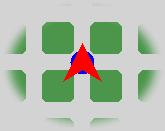
  2. In the driver, configure the City as suggested below.
  3. Examine the RobotSE documentation to determine the number of methods the class offers that return a boolean result. Be sure to also include those methods inherited from Robot in your count. Familiarize yourself with the name and purpose of each of these methods.
  4. What word typically appears as part of the name of each of the boolean methods?
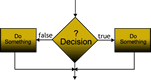
  5. Implement Avatar's act() so that it picks up the Thing at (1,1) only if there is one present (we don't want zelda to break!), otherwise it does nothing. Go back and temporarily comment out the Thing in the driver and test your code again.
  6. Add more statements to the act() method so that the object moves forward if it can, otherwise it does nothing. Go back and temporarily comment out the Wall in the driver and test your code again.

The if...else Statement

  1. In Step 6, zelda did nothing if her way forward was blocked. Modify your code to have zelda go around the Wall if she must to the intersection on the other side and facing the same direction as she was before the action. Note: Do not forget your Stepwise Refinement skills.
  2. In Step 5, zelda took no specific action if there was no Thing to pick up. Modify your code to have zelda put a Thing on the intersection if one isn't available.
  3. Currently, the driver ensures zelda has exactly 5 Things in her backpack. Modify the driver to have the Princess start with a random number of Things from 0 to 5, inclusive.
  4. Is your response to Step 8 now problematic? What can be done to guarantee your application doesn't generate a run-time error?
  5. (becker.robots.Direction) Add the method private void faceEast() to your Avatar class that results in the object facing east. Once successfully implemented, one could copy, paste, and edit this method to produce methods for the each of the other three directions.
  6. Hmmmm....do we really need four separate face methods? Add the method public void face(Direction other) that results in the object facing the direction specified by the explicit parameter, thereby eliminating the need for the four methods implemented in Step 11.
  7. When zelda acts, she should face NORTH if the number of Things in her backpack is even, otherwise she should face south.
  8. When zelda acts she should face one of the four cardinal directions (ESWN) when the number of Things in her backpack divided by 4 results in (0123) respectively.
  9. When zelda acts she should face Avenue 3.
  10. When zelda acts she should face Street 3.
  11. When zelda acts she must ensure (as efficiently as possible) she is on an even-numbered Avenue.
  12. When zelda acts she must ensure (again, as efficiently as possible) she is on an odd-numbered Street.
  13. Implement the Avatar method private move(Direction dir) that moves the object one intersection in the direction specified, leaving it facing the same direction it was originally.

The while Statement

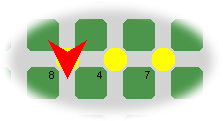
  1. Have zelda tell you how many Things she was originally given. Modify the Decisions driver to have zelda on street 1, avenue 4, facing south, with a random number of Things in her backpack in the three-digit range. Implement the Avatar method, private void talkToMe() that has zelda drop the number of Things on adjacent intersections equivalent to each of the digits in the number of Things she originally had in her backpack. The final state of a run below tells us she was originally given 847 Things.

  2. When zelda acts she drops half of the Things in her backpack.
  3. In #15 you were asked to have zelda simply 'face' Avenue 3. Comment out any Walls and have her actually go to Avenue 3.
  4. Combine #15 and #22 into a general purpose method with the header public void goToAvenue(int n) that sees the Avatar object move to Avenue n.
  5. Implement the method public void goToStreet(int n)modeled after #23 that sees the Avatar object move to Street n.
  6. Consider (0,0) to be the home position. Implement the method public void goHome()that makes use of the previously-developed methods.
  7. In the driver, reposition the wall farther to the right, on the same street as zelda and have her face east. Implement the Avatar method public void goToWall() method that sees zelda proceed as far as she can without breaking. Recode the act() to test your method.
  8. In the driver, replace the Wall on zelda's street with a Thing. Implement the Avatar method public void moveToThing() so that zelda moves until it encounters the Thing. Recode the act() method to test your modification.
  9. Since Avatar extends RobotSE, it inherits the pickAllThings() method. Modify the driver by adding many Things at (1,1). In Avatar's act() method, invoke the pickAllThings() method to get all the Things from (1,1). Once you are convinced it works as expected, override the pickAllThings() method by coding the method yourself that does the same thing.
  10. To your pickAllThings() method, add statements necessary to display the number of Things zelda picked up to the Console Window. Note that this is not simply the number of Things she has in her backpack.
  11. If the task is simply to determine the number of Things at an intersection, is it necessary for zelda to pick them all up to determine their count? Develop the method displayThingCount() that displays the number of Things at the intersection that zelda is located at without having to pick them up.
  12. IIterate Examining. Take another look at this week's RobotBinaryChallenge driver, in particuIar, the examineRobots() method of the City class. Notice both the return type of the examineRobots() method and the other 'examine' methods. Task. In addition to the generic Thing objects on the same intersection that zelda starts on fron the previous exercise, add a Wall and a Flasher. Implement the Avatar method public void displayThings() that displays the details of all Things on zelda's intersection to the Console Window.
  13. IPredicate Examining. Inspection of the inheritance hierarchy for Avatar defines her also as an instance of the RobotSE, Robot, Sim, and Object classes. Since the hierarchy does not include the Thing class, she was excluded from the count in the previous task. However, a Thing object is also an instance of Sim. Develop the method public void displaySimCount() that will display the number of Sim objects on zelda's intersection to the Console Window.
  14. Develop the method public void displaySims() that will display the details of all Sims on zelda's intersection to the Console Window.

examineThings()

The CampusCleanUp project requires that the colour of a Litter object (Thing) be identified. The technique for doing so isn't all that intuitive and even though a thorough explanation is beyond us right now, we're going to explore (somewhat superficially) how it's done.

Classes that extend the Robot class inherit the method,

public final IIterate examineThings()

that returns a list of the Things at the intersection. These Things can be examined, one by one. After invoking this method each Thing can be examined by calling the Iterate object's next() method. In future projects there may be multiple Things but for this assignment, there's only one.


The if and while Statements Combined

  1. Sorting a Single Thing. Configure the City by placing a Thing at (1,4). Set the Thing's Icon to a random size between 0.0 and 1.0. Place zelda at (1,4) as well. Implement the Avatar method private void sortThingBySize() that will result in zelda relocating the Thing to (1,3) if the relative size is less than 0.5 otherwise it is placed at (1,5). In either case, zelda should return to (1,4) when finished.
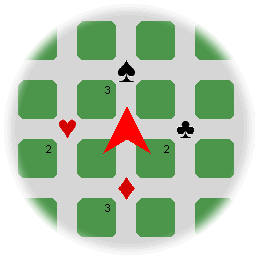
  2. Refinement. Add the Avatar method private void placeAt(int s, int a) that commands zelda to go to (s,a) and place the Thing she is carrying if it has size less than 0.5 and a different (s,a) for a relative size greater than 0.5. Once placed, zelda should still return to (1,4). Recode your sortThingBySize() method from Step 34 to exercise your placeAt method.
  3. Sorting Multiple Things. Reconfigure the City by placing a random number of Things, between 3 and 7 inclusive, at (1,4). Implement the Avatar method private void sortThingsBySize() that will result in zelda relocating each Thing to (0,3) if the relative size is less than 0.5 otherwise it is placed at (2,5). Again, zelda should return to (1,4) after each relocation.
  4. Playing Card Classes. Add the following class files to your Decision Project: Club.java, Diamond.java, Heart.java, Spade.java as well their respective image files: club.gif, diamond.gif, heart.gif, spade.gif. Each of the image files is 30px wide and 40 px high. Implement the SuitIcon class (fashioned after either SpiderBotIcon or WallGuardIcon) that will support the four suit classes.
  5. Sorting Cards. Reconfigure your driver to place 10 random suit objects at (1,4) and position zelda initially on (1,4) as well. Without changing Avatar's act() method (it should still be calling the sortThingsBySize() method from Step 34), observe what happens when the project is run. What conclusion can you draw about the size of the suit objects?
  6. Predicates. Review the documentation for Thing's examineThings(aPredicate) method. Add the source file ASuitPredicate.java that defines a class by the same name. Examine it's contents. What does it appear to offer?
  7. More Detailed Examinations. Develop the Avatar method, sortThingsBySuit() that will result in the suit objects being relocated to their respective intersections as follows: club objects to (1,5), diamond objects to (2,4), heart objects to (1,3) and spade objects to (0,4). Ensure that the suit images appear face up.


Drivers' Ed

  1. As you are aware, on construction, when Robot objects and their subclassed objects are provided with an initial number of Things, they appear with yellow CircleIcon's of relative size 0.5.